
Reading Between the Boards: Hunting Threats on monday.com

About the Platform
monday.com is an AI work-management platform with roughly 225,000 paying customers across ~200 countries and nearly every vertical, from Fortune 500 brands to mid-market engineering, marketing, legal, and security teams.
Why it’s a valuable target
monday.com boards routinely hold critical data classifications, including Personally Identifiable Information, proprietary Intellectual Property, restricted corporate financials, confidential legal and commercial commitments, and highly sensitive operational security intelligence.
With that concentration of sensitive material in one place, a single export-board event can move a great deal of data, and a single compromised account can lead to a serious breach.
Motivation
Threat hunting against the monday.com audit log is under-researched. The data inside makes the platform a high-value target, and attacks against SaaS tenants have become an industry trend. The gap between “valuable target” and “available detection content” is what this post aims to address.
The Threat-Hunting Mindset
Most of what an attacker would do on a compromised monday.com account looks like ordinary work: exporting a board, generating an API token, downloading a file. We can’t alert on every one of those actions. Teams perform them constantly just to get their work done.
So instead of waiting for an alert that may never fire, threat hunters start from a question: if an attacker were already inside this tenant, what would they be doing, and what trail would they leave in the audit log?
The question is informed by what real attackers are known to do. Frameworks like MITRE ATT&CK give the practice its starting points, and the answer is a structured search of the data.
Most hunts come back clean. Occasionally, one of them finds someone doing something they shouldn’t.
To run an effective hunt, we first need to understand where the crown jewels are and who can access them.
Where the Data Lives
To effectively hunt threats, you need to understand the environment the attacker is navigating. The section below isn’t just reference material; it’s the terrain map you will use to filter noise, prioritize alerts, and perform triage.
On monday.com, data lives inside boards, which sit inside workspaces (folders optionally group boards together).
A board is the primary container, but the sensitive content sits one level deeper: each board holds items (the rows), updates (comments and posts on items), and assets (the files attached to items and updates).
Board types: There are three types of boards on the platform:
- Main: visible to all members and viewers in the account by default.
- Private: visible only to users explicitly subscribed to the board.
- Shareable: like private boards, but can also include external guests invited into the board.
User types: There are four types of users in a monday.com account:
- Admin: full access to all account data, can perform every administrative action.
- Member: can create and edit content on the boards they have access to.
- Viewer: paid seat with read-only access.
- Guest: external user invited by email, limited to the specific boards they are invited to.
Permissions: monday.com permissions are layered. Access is controlled at five levels, from the entire account down to a single column on a single board:
- Account-wide custom roles (Enterprise): admins define explicit permission sets and assign them to users.
- Workspace roles: gatekeepers who can see or edit boards within a workspace.
- Board permissions: control what non-owner members can do on a given board.
- Item permissions: restrict which users can edit specific rows, typically via People or Status columns.
- Column and doc permissions: restrict access to individual columns or docs within a board.
The Audit Log
BEFORE ANYTHING ELSE
The monday.com audit log is Enterprise-only and available only on those subscriptions.
The audit log is a server-generated record of events such as authentication, identity, and permission changes, exports, downloads, DLP findings, and platform signals. It is accessed via REST API and gives teams visibility into exactly what is happening across the account.
Logs are delivered in near real time, typically within seconds to minutes. At the time of writing, monday.com does not enforce a retention limit, so logs are not automatically deleted after a fixed period. The log structure is JSON-based, and the platform supports native SIEM ingestion. Retrieval is handled via API pull requests.
monday.com also offers a per-board activity log that tracks all actions on a single board, but we won’t cover that log in this post.
Schema
The audit log schema:
| FIELD | DESCRIPTION |
|---|---|
| account_id | Unique ID of the monday.com account. |
| activity_metadata | Nested object containing event-specific details about the action. |
| client_name | Browser or application used. |
| client_version | Version number of the client browser/app. |
| device_name | Hardware type or machine name. |
| device_type | Device form factor. |
| event | The specific action triggered. |
| ip_address | Public IP address of the user. |
| os_name | Operating system used. |
| os_version | Version of the operating system. |
| slug | The account’s unique URL prefix. |
| timestamp | Exact date and time of the event. |
| user_agent | Raw browser/OS identity string sent by the client. |
| user_id | Unique ID of the user who performed the action. |
Traps before you hunt
Human-readable usernames
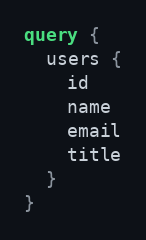
Some audit log events identify users by numeric ID only. We address this by enriching our SIEM with a dynamically updated lookup table that maps each user ID to a username. The mapping can be pulled from the GraphQL API:
Endpoint: https://api.monday.com/v2 · Method: POST
One field, many shapes
Top-level fields are consistent across events. The nested activity_metadata shape is event-specific. We handle this by keying detections on common fields and parsing activity_metadata dynamically per event type when needed.
The Chapters of an Attack
The chapters of an attack represent the full lifecycle of an account takeover. An adversary rarely strikes all at once. They follow a deliberate, methodical path.
The following stages trace this exact journey. Each hunt identifies a specific link in this chain. By understanding how these events connect, you can pivot from reacting to isolated alerts to uncovering the full story of an adversary navigating your environment.
What Does Initial Access Look Like in monday.com?
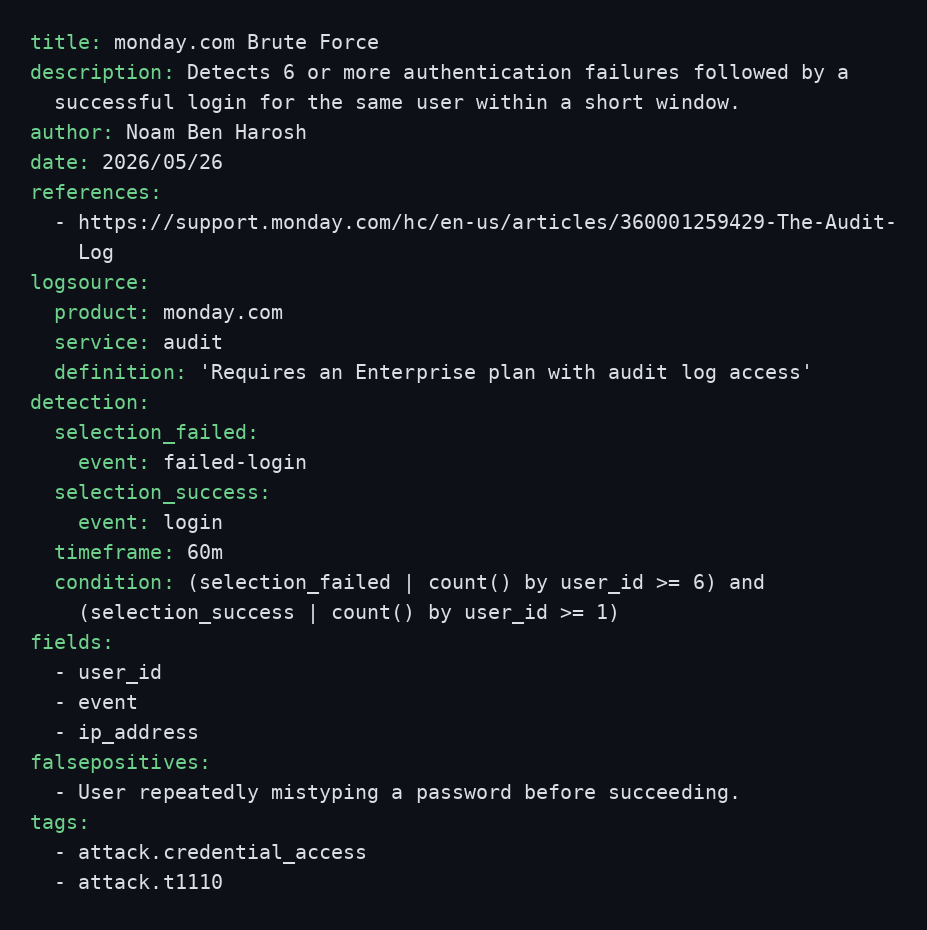
The brute-force scenario:
Every attack starts with initial access. A common method is using compromised credentials, and a common way to obtain those is a brute-force attack, which we can hunt for in our logs.
We filter to two event types: login and failed-login. Both can be noisy on their own. What differentiates an attack is frequency and timeframe. We look for a run of failed logins and a successful one within a very short window, the signature of an attacker trying many passwords and eventually finding the right one.
PLATFORM MITIGATION & THRESHOLD RATIONALE
The platform’s built-in defenses trigger after a threshold of failed attempts is reached. Setting your detection threshold lower than the platform’s limit allows you to surface suspicious activity before the automated defenses intervene.
It doesn’t matter if a successful login is the very last attempt. Because brute-force attacks are automated, malicious scripts often keep guessing credentials even after they’ve already gained access.
Did they really forget their password?
The forgot-password flow has a legitimate purpose: getting a locked-out user back in. But threat actors have found other uses for it.
With a compromised mailbox or malicious mail forwarding, an adversary can complete the forgot-password cycle, take over the account, and gain a foothold.
event: forgot-password
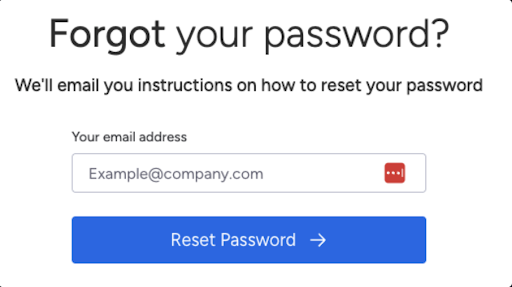
This event rarely warrants a standalone alert, but its high-value context: a forgot-password immediately followed by a login from a new IP or device, or preceding any of the persistence events below, is worth surfacing in a correlation.
What Does Persistence Look Like in monday.com?
After gaining a foothold, an adversary usually wants to keep it. Two common methods are inviting an attacker-controlled user or capturing the account’s personal access token. Both generate audit events.
On monday.com, user creation happens through invitations. An attacker may invite a new user they control, thereby retaining access even after the compromised user’s password is rotated or the session is terminated.
event: user-invite
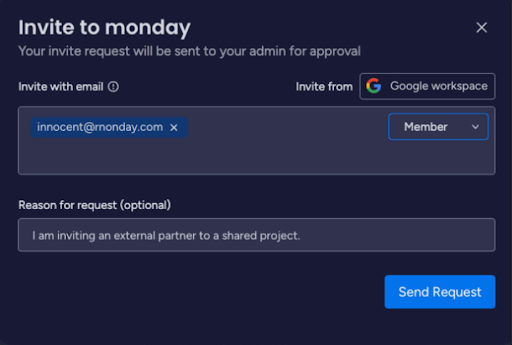
An attacker may also capture the account’s API token to persist without the original username and password. The token outlives the session and survives password changes, making it a durable foothold.
event: view-access-token

What Does Privilege Escalation Look Like in monday.com?
Having a foothold isn’t the same as having reach. An adversary who lands as a low-privilege user often seeks to gain access to restricted data that their current permissions do not allow.
One way an adversary can achieve this is by repeatedly requesting to join teams, betting that a busy manager will eventually approve the request by mistake or confuse the attacker with a legitimate user.
Most of those requests get declined, and that’s exactly what leaves the trace. A burst of declined requests tied to the same user, whether against one team or spread across several teams, is unusual for a typical user and worth surfacing.
The event is decline-request-to-join-team, and the signal is volume against a single affected user:
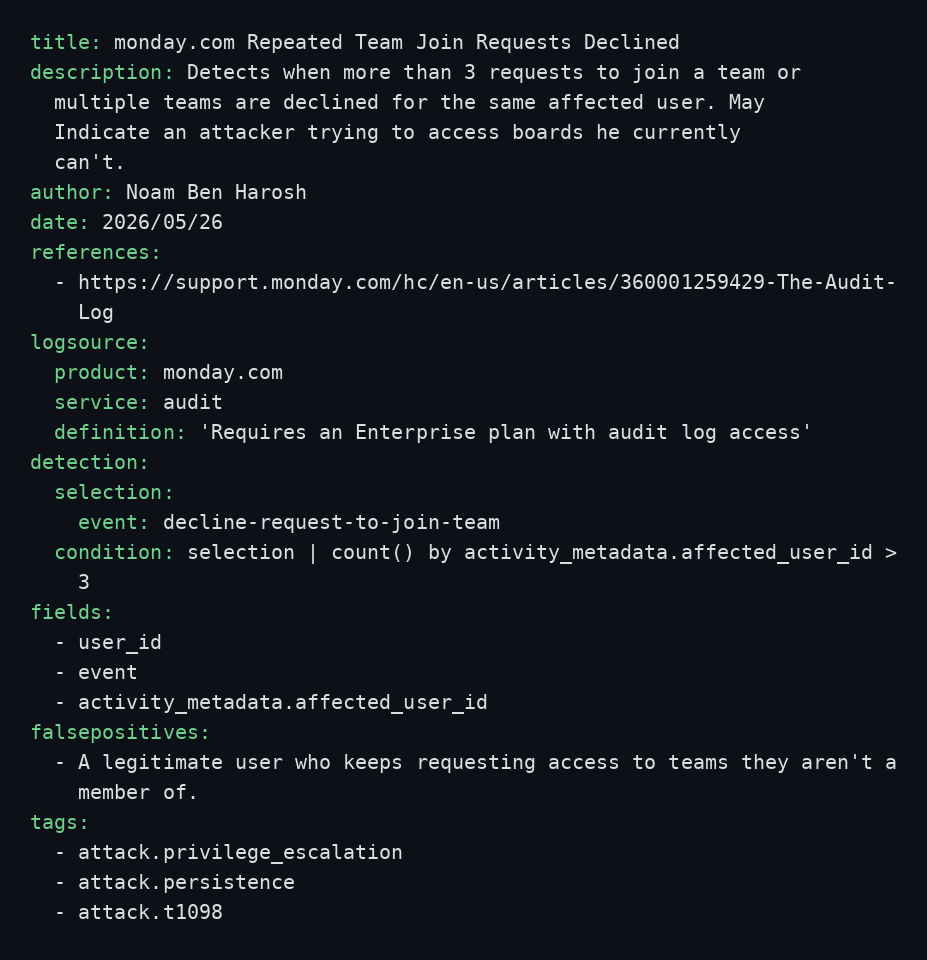
What Does Defense Evasion Look Like in monday.com?
To make repeated access easier, an adversary usually wants to weaken whatever would slow them down on the way back in, and multi-factor authentication is the first thing on that list. MFA is what keeps a stolen password from being enough on its own, so switching it off quietly upgrades a one-time compromise into durable, repeatable access: the attacker can log in again later, from anywhere, without ever facing a second-factor prompt.
Disabling MFA is rare and rarely innocent.
It also leaves a clean trace. The action surfaces as a security-settings-change event carrying a settings operation of two_factor_auth_canceled. These two fields together are precise enough to write a focused detection rule with very few false positives.
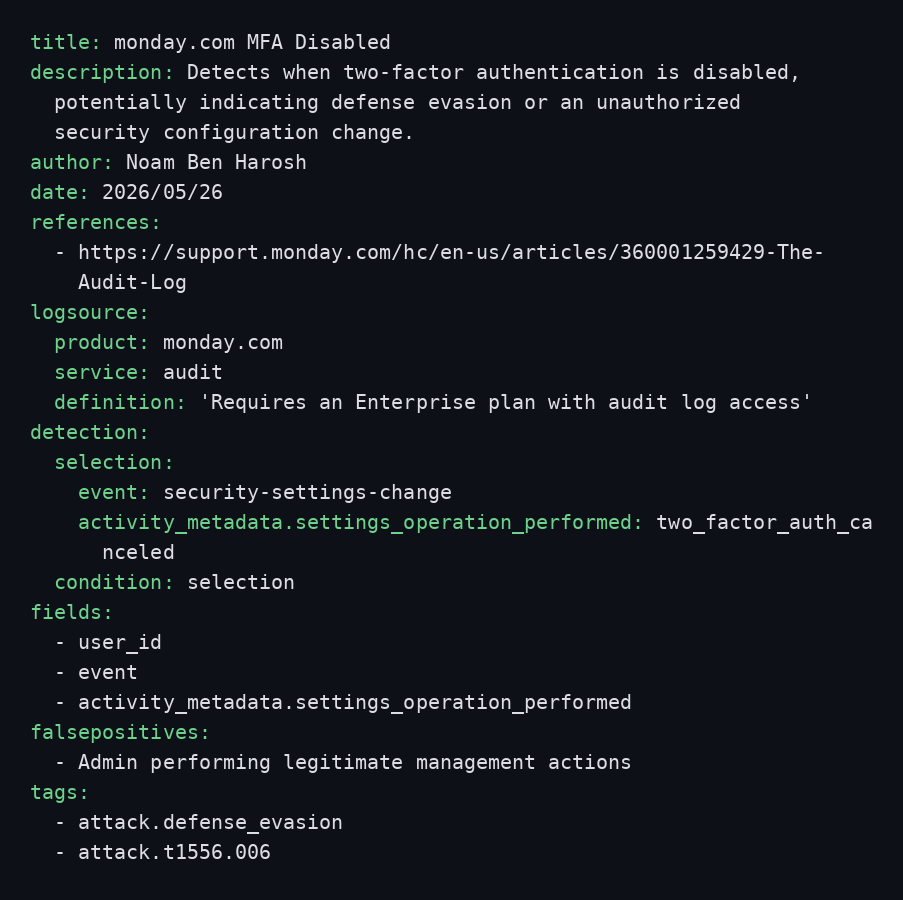
What Does Exfiltration Look Like in monday.com?
Once an adversary has access to the data, the final goal is to get it out, and the most direct way to walk out with a board’s contents is to export it. A legitimate user exports a board now and then. An attacker exfiltrating data exports many boards quickly, often touching boards they have no business reason to open.
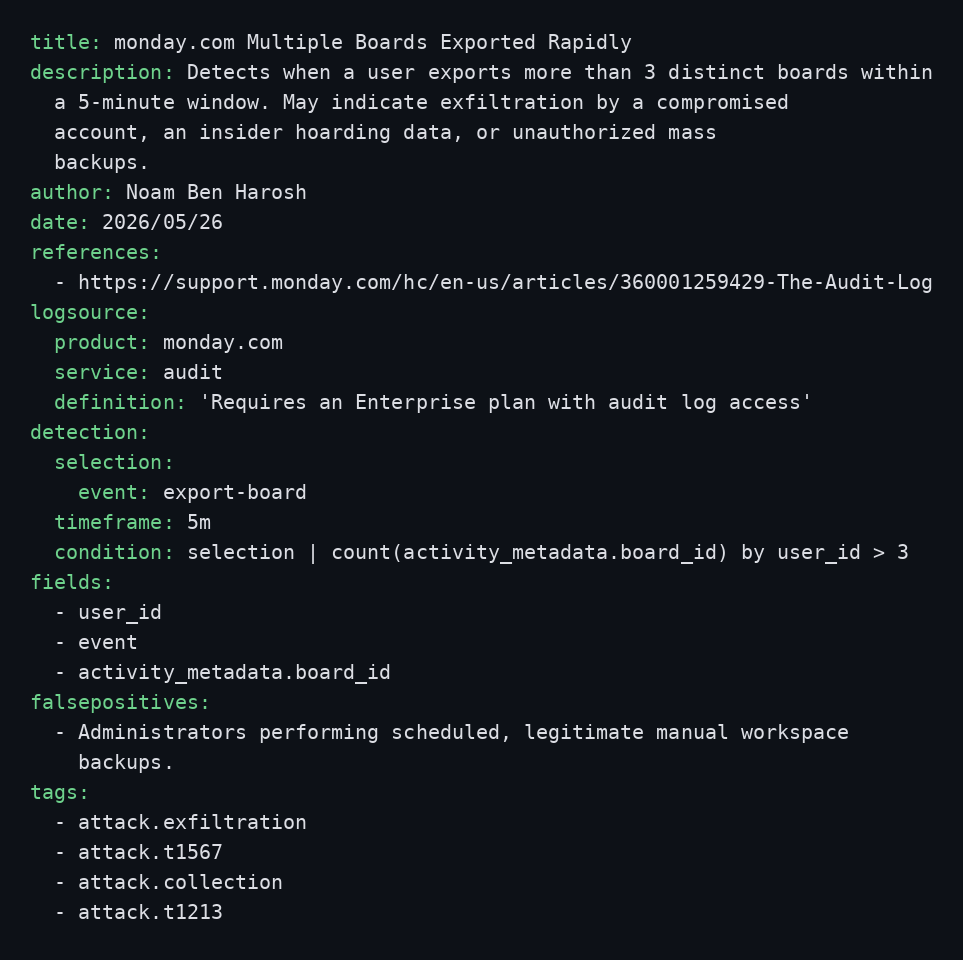
EVASION TO KEEP IN MIND FOR THIS RULE
- Low-and-slow exfiltration. An attacker who exports one board per hour stays under every count above. Pair volume rules with longer-window baselines to close part of this gap.
Exfiltration through AI agents
monday.com’s built-in AI agents are genuinely powerful. They read across boards, summarize work, surface updates, answer questions, and automate the tedious parts of a workflow, all without a person clicking through each board. An agent subscribed to your boards can see and act on everything in them, continuously and automatically.
That convenience comes with risk. An agent subscribed to a board is a standing, automated reader of its contents, and an attacker who controls an agent can turn that convenience into a persistent exfiltration channel.
Instead of exporting boards one by one and tripping a bulk-export Hunt, an adversary can subscribe a large number of boards to an agent and quietly siphon data through it long after the original session is gone. No repeated logins, no manual exports, just an agent doing what agents do, against far more boards than it ever should.
The signal is the same as for board exports: volume and speed. A burst of board subscriptions to a single agent in a short window is the signal. The rule watches agent-board-subscribed and fires when one agent is subscribed to an unusual number of distinct boards too quickly.
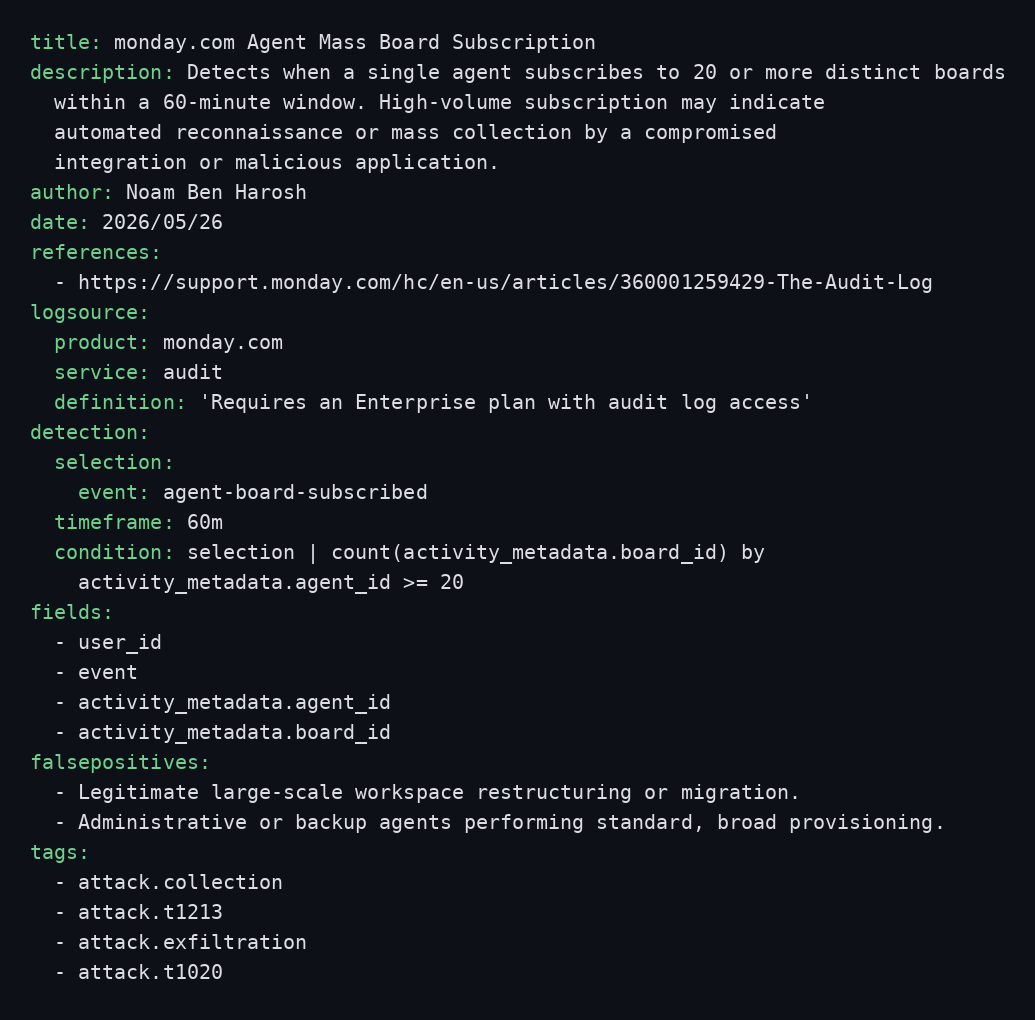
Monitoring the Export Account Data feature
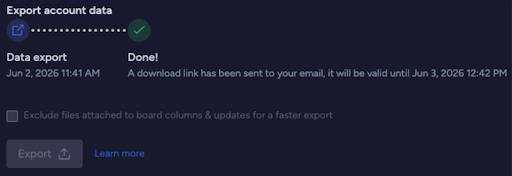
In monday.com, even account administrators are restricted from viewing the contents of private boards by default. However, the Export Account Data feature provides a powerful administrative capability that allows for extensive data visibility. While this feature is designed to let customers control, back up, and migrate the data they own, it requires close monitoring in the event of an admin account compromise.
event: export-account-data
Correlation: Chaining the Kill Chain
Each rule above is useful on its own, but the strongest signal comes from chaining stages together by user_id. A single failed-then-successful login is medium-confidence. The same user then viewing an access token and exporting a dozen boards within the same day is a strong indicator of account takeover.
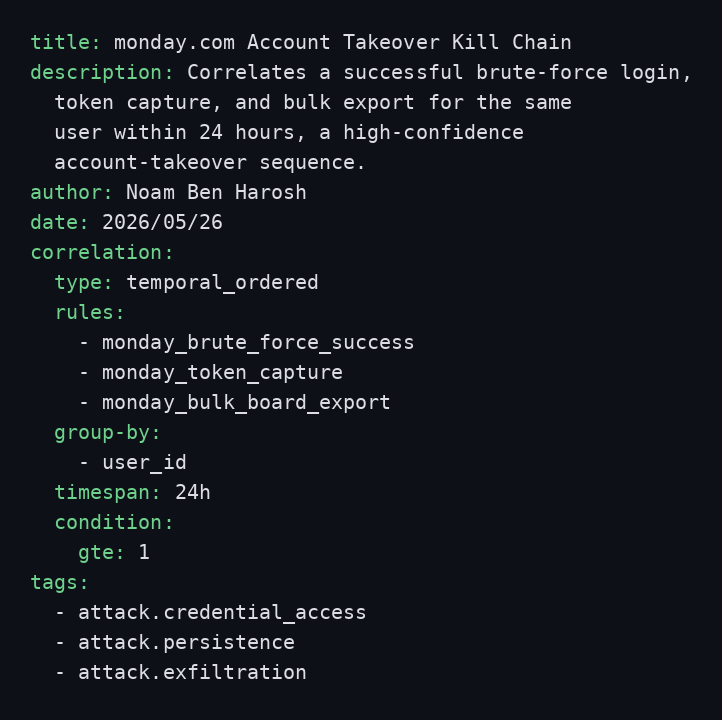
ORDER MATTERS
The temporal_ordered type only fires when the stages occur in sequence (login → token → export), which is exactly the narrative of a takeover and far less likely to be a coincidence than any one event on its own.
Takeaways
monday.com tenants concentrate exactly on the kind of data attackers are after, and the audit log gives defenders a clear, near-real-time view of the actions that matter, provided you know which events to watch and how to connect them.
Start by running the hunt against your organization’s telemetry, learn how your team actually works, and tune your thresholds accordingly.
And don’t forget to ask yourself: should this user, with this role, be exporting this board?
If you stumble upon an adversary trying to harm your organization, you’ll be glad you searched.
Stay safe out there!
monday.com’s built-in mitigations
The hunts in this post assume an adversary is already inside, but monday.com also ships with controls built to stop them from getting there and to contain them if they do. Enterprise accounts can enforce SSO and two-factor authentication, scope data through layered account, workspace, board, item, and column permissions, and monitor the entire tenant through the audit log and DLP signals used throughout this post. The two guides below walk admins through hardening an account end to end.
References
- https://support.monday.com/hc/en-us/articles/360001259429-The-Audit-Log
- https://support.monday.com/hc/en-us/articles/360019222479-Permissions-on-monday-com
- https://support.monday.com/hc/en-us/articles/360002144900-User-types-explained
HARDENING RESOURCES
Security essentials for admins · monday.com Academy
https://monday.com/academy/view/lesson/security-essentials-for-admins
Secure configuration checklist · monday.com Support
https://support.monday.com/hc/en-us/articles/34336185460498-monday-com-secure-configuration-checklist