
Building a Reliable and Extendable Notifications Platform

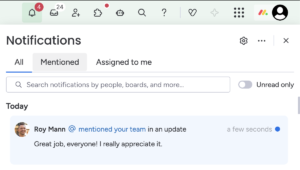
Notifications are a big part of monday.com’s Work OS; they’re the layer that drives actions across workflows. It’s the place where you find the messages your colleagues left you, the leads your CRM AI agents found for you, or get a sprint dev summary to see how the team did in the last week.
It’s a feature that brings users back to the system and enables us to increase product engagement by giving users real value.
You can get your notifications in email, mobile, in-app notification, Slack, and MS Teams. Not a single notification can be lost, as it’s a crucial part of our users’ day-to-day lives.
Scaling the Platform
We had a problem, as monday.com grew bigger and bigger, the infrastructure that was there from the beginning needed to evolve to support a larger scale.
It was built as part of our Ruby on Rails monolith and leveraged Sidekiq background job processing. Once the job was completed, the processor iterated over the various integrations and sent the email, the Websocket message, mobile push notification, etc.
Over time, three areas stood out for improvement: extendability, maintainability, and reliability.
New use cases that required notifications came to life every day, but although adding notifications sounds like an easy task, it became a multi-day effort.
The monolith implementation had grown organically over time, so it was hard to navigate through the files that made up a notification. It required familiarity with the system, and even we, as domain owners, had a hard time navigating the code.
The PR had to go through our code review, pass a long CI pipeline, and even after you managed to merge your PR, due to the monolith’s deployment policy, it took 2 days to deploy to production. In addition, allowing users to edit the files that define the notification flow introduced more variation over time, which made the overall flow harder to maintain.
Fixing bugs or adding new features required deep system knowledge. We wanted to support more channel options (like Microsoft Teams), but it required familiarity with the system and Ruby on Rails; new hires didn’t have this knowledge.
We decided we had to build a long-term solution.
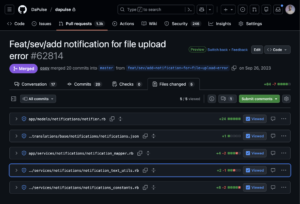
Adding a new simple notification required editing several files
Notifications Flow 2.0
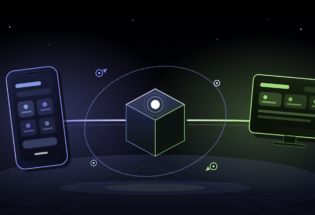
To address maintainability issues, we decided to extract the orchestration logic into a separate microservice implemented in TypeScript for better failure isolation, separate deployment, and improved dev velocity.
Making It Easy for Developers
Next, we decided to leverage monday.com’s apps framework, which allows developers to extend monday.com’s capabilities. We created a new notification feature type that would keep the text template.
Now, to add a new notification, no code needed to be written; we just needed to add a new app feature, which was kept in a JSON format:
{
“name”: “example_notification”,
“displayOptionsByChannel”: {
“1”: {
“mondayTemplate”: {
“title”: “New notification in your account”,
“content”: “You can also inject params if you want {{ params.example_param }}.”
}
}
}
}
And to make everything smooth, we implemented a small SDK, which allows the developers to trigger the notifications from their own microservice without going through the monolith:
import { MondayNotificationsService } from ‘@mondaydotcomorg/monday-notifications’;
const mondayNotificationsService = await MondayNotificationsService.create();
await mondayNotificationsService.send(
accountId,
userIds: [1,2],
kind:’example_notification’,
createdUserId: 3
);
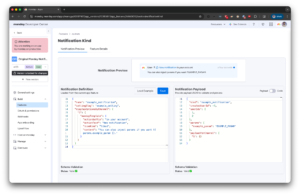
Before adding this playground, developers needed to have a local setup of our microservice and trigger the full process to check their change.
The feedback loop was slow and frustrating.
The playground, together with the simple SDK, made the dev experience much more pleasant!
The Orchestration Pipeline
And then came the fun part for us: building a fault-tolerant and scalable orchestration pipeline. We chose SQS for its AWS-native integration, built-in durability, and native DLQ support. It’s a managed service, so there is no operational overhead.
We started with a naive solution, with only one queue. The users used the SDK, triggering multiple notifications to multiple people. A new job was inserted into the queue, it was consumed, and the consumer iterated over the target users, starting to send them emails, Websockets messages, and mobile push notifications.
We thought everything was great until people started getting duplicate notifications one after another.
When you create an SQS queue, there are several parameters you can tweak, two of which are:
- Visibility_timeout_seconds
How long a message stays hidden from other consumers after being picked up for processing. If the consumer didn’t finish within this time, it becomes available again for retry. - max_receive_count
The maximum number of times a message can be received before being automatically moved to a Dead Letter Queue (DLQ) for troubleshooting.
In our case, the visibility timeout was configured shorter than the processing time required for large fan-out jobs. When a notification targeted many users, the message became visible again before processing was completed, causing another consumer to pick it up and re-trigger the full flow. This resulted in duplicate notifications that we quickly identified and resolved.
After this event, we decided to split this job into multiple parts. We created a three-stage orchestration flow:
- Stage 1 – Processing
Receives notification requests via the SDK, sanitizes text and metadata, and splits recipients into optimized batches. - Stage 2 – Filtering
Fetches user context (locale, board info), checks account-level and user-level settings (queries these preferences in a batch to avoid the N+1 problem), applies muting rules, and fans out per-user. - Stage 3 – Delivery
Delivers in parallel across all channels (monday.com, email, Slack, mobile) to a specific user.
We implemented exponential backoff with jitter to handle transient failures. Fatal errors (403, 404) skip retries to prevent infinite loops. Crucially, if Slack fails but email succeeds, only Slack retries, preventing duplicate notifications.
After three retries, the message is moved to the Dead Letter Queue, and the on-call receives an alert for manual investigation.
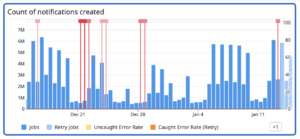
We instrument every stage with Datadog metrics (delivery rates, queue depth, latency). This observability has proven invaluable for quickly pinpointing issues when they arise.
Impact
Today, we send over 8m notifications daily.
We extended our infrastructure easily and have added support for Microsoft Teams. Dev velocity has increased significantly, and developers can add a new notification type in an hour.
And on a personal note, this change has really made working on this system a lot more enjoyable.