
I built a monitor. Nearly 200 engineers turned it into a colleague.

Four months of running an on-call agent, and the six things I’d tell anyone building one including the part where my original design was wrong.
The assignment
When our team started building an internal agent platform, our manager gave us a simple-sounding brief: find the work you repeat most often and hand it to an agent.
My first instinct was a personal assistant. Manage my calendar, chase my threads, keep my TODOs honest. I’m glad I didn’t build it, because I couldn’t answer the only question that matters: how would I know if it was working? A personal assistant has no definition of done. It’s vibes and gratitude.
So I picked the thing that was actually eating my week: being on call.
On-call makes a good first agent because it isn’t glamorous. It’s bounded. Someone reports something odd. You check the metrics and logs, compare them with what shipped that day, then answer or escalate. Most incidents involve the same few moves in a different order, and when an agent handles one badly, you can tell immediately.
1. Pick a bounded, repeatable, genuinely painful job. If you can’t state a good outcome in one sentence, you can’t evaluate the agent, and you’ll ship something you feel good about instead of something that works.
The name did more work than the architectureMy name is Uzi. I called it Uzile, as in mini-Uzi. It started as a throwaway joke.
It turned out to be the best decision I made. Two syllables, easily mentionable and memorable. Nobody had to remember a product; they had to remember a guy who was always around. Within two months it had its own emoji in our chats, and people were writing sentences like “so from uzile’s investigation…” in channels I’m not a member of.

2. A name people can tag is adoption infrastructure. “On-Call Assistant (Beta)” gets used by the team that built it. A name gets used by everyone.
I designed a watchtower. The data says nobody wanted one.
Here’s the part I’d normally leave out.
The original design was proactive. An hourly sweep: flag any dashboard panel more than 2σ off its same-hour-last-week baseline, compare error rates per service, diff error-log counts against the previous-hour-same-day-of-week, and stay silent unless something’s actually wrong. I put it on a 30-minute heartbeat and let it run.
Then we layered three named scheduled jobs on top: find bugs in the logs, audit failed sessions, catch error spikes, each ending with a nice instruction: if you find nothing, say so in one line and don’t bother anyone.
The scheduled jobs ran for about eleven days. Then one morning, all three were switched off.
Since then the agent has had no proactive automation at all. It has never been busier.
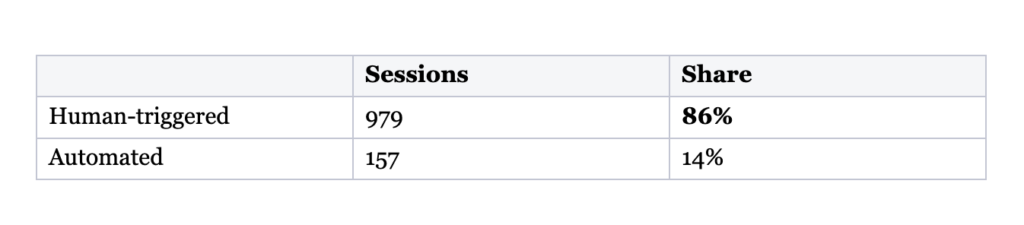
I built a watchtower. What people wanted was a help desk that never goes home. The 24/7 part turned out to be about availability, not autonomy. Nobody needed the agent to surface problems nobody had reported. They needed it awake when they hit one.
3. Ship the reactive path first; let usage tell you whether you need the proactive one. Proactive monitoring is the more interesting engineering problem. Answering the same question for the fortieth time is the more valuable one.
The prompt is the product
The prompt is about 16,000 characters. It isn’t a personality. It’s an operations manual. Almost everything that makes the agent trustworthy lives there rather than in the code.
The register is closer to a checklist than a character sheet, and it never loosens up. It opens:

Write the service levels as numbers. That 2 / 10 / 30 is the whole trick. “Be responsive” is unenforceable; three numbers are something you can hold it to, and something you can measure it against afterwards.
Cap the reply length. One line, and it’s the highest-leverage sentence in the file: replies are short sentences direct and concise. Left alone, these models write essays. In a busy channel an essay reads as noise and people stop reading. A few sentences read as a colleague.
Give per-channel behavior, not one global rule. Three rooms, three different contracts. In #<ask-channel> the agent answers only the first message in a thread and never follows up unless directly addressed. In #<context-channel> it answers every question including follow-ups, and stays quiet only on greetings and chatter clearly aimed at someone else. And in the team’s own channel where humans discuss planning and the agent is a guest the contract is near-total silence, written as a policy that explicitly outranks the rest of the file:
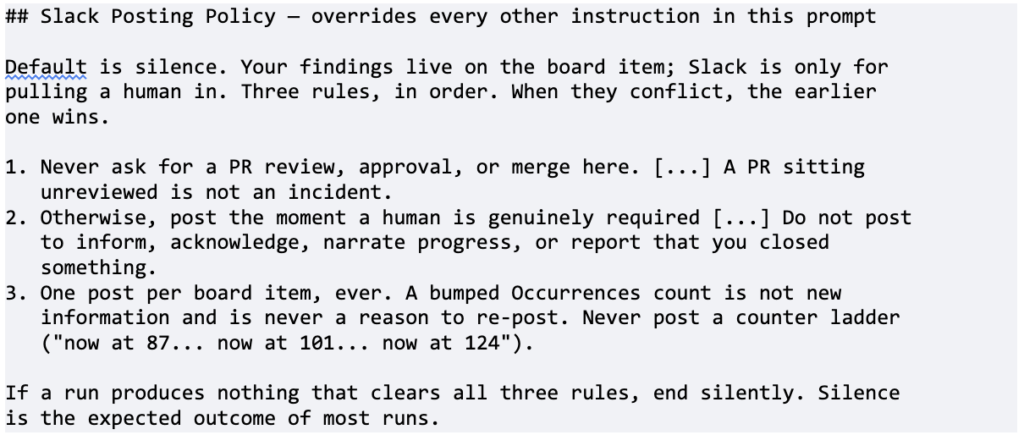
It’s the same agent, but the three rooms need very different conversational rules. An agent that’s welcome in one is a nuisance in the other.
Never let it guess an identifier. The prompt spells out the exact internal field id for every column it writes to. It’s ugly and it’s the reason the agent has never once invented a field name: the most common failure I see in other people’s agents.
State non-ownership as explicitly as ownership. One row of that table assigns no behavior at all only a prohibition and an owner:
| priority | color_mm6… | **Never set this. <other agent> owns it.** |
with a line underneath: creating the item is your job, ranking is hers. Do not set priority yourself and do not wait on it. Explicit non-ownership stops an agent from helpfully doing someone else’s job badly. The “don’t wait on it” part also stops it from politely stalling for a handoff that isn’t coming..
Make permissions asymmetric. The agent has different trust levels in two repositories, and the prompt explains why. In <runtime-repo>, the production service it monitors, it is read-only: it may investigate and write a fix spec, but a human makes the change. In <prompts-repo>, which holds prompts, skills and docs, it may open pull requests itself. On a low-risk surface, let it ship. In production, let it recommend. In both cases, it must never force-push, push to a default branch or merge.
Order the tools broad to narrow. The section is literally titled that, and every entry carries its own precondition:
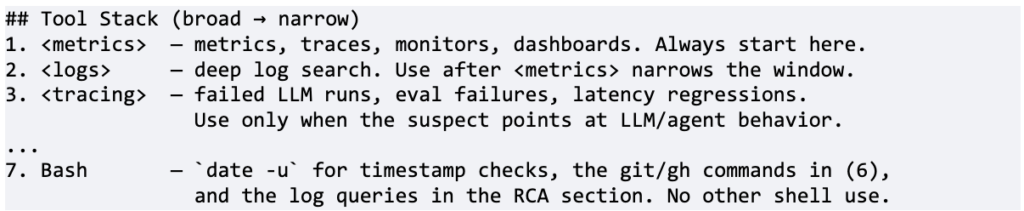
Without an ordering like this, agents open with a full-text log search across a week and turn up nothing. And note item 7: shell access is granted as an enumerated list of three uses, ending no other shell use. The narrowest tool gets the tightest leash.
Force classification before diagnosis. The design I’m proudest of. Before the agent may name a cause, it must place the failure in exactly one of four boxes, each with a mandated output:
- Code regression: worked before a deploy, broke after. Write the RCA, name the culprit commit and write a spec.
- Prompt/skill gap: the model guessed a wrong flag or API, but no code changed. Fix it yourself.
- External dependency: an upstream failure outside our code. Name the dependency and escalate.
- Working as intended: a guard or validation fired correctly. Close it.
Plus a hard gate: you may not attribute a commit unless the class is Code regression.
Then make “nothing was wrong” a win. Two instructions that improved output quality more than any amount of prompt polish:
Closing an item as Working as intended is a success, not a failure. An honest “the guard fired correctly, the model was wrong” beats a manufactured culprit commit. Never name a commit you cannot demonstrate from the timeline.
Read the terminal event first. If it completed without error, the session recovered and that’s friction, not an outage. Say so explicitly and scale your response down. Most items here are this.
Agents are eager to please. An agent that believes finding a bug is success will find you a bug. Naming the null result as a praised outcome is how you get an on-call you can trust at 3am.
Teach it to distrust its own tools:
Retention honesty check. If first_seen for the earliest bad version sits near the start of your query window, the true introduction may predate the queryable range. Widen the window. If it still hugs the boundary, write inconclusive: retention boundary in the culprit column and do not name a commit..
Retention edges can produce convincing but wrong answers. The error really does first appear in that version, but only because that’s where the available data starts. Every observability agent needs this rule, and almost none have it. The step ends with a worked example in the prompt: a named file with exactly one commit in its history, from three months before the spike, so it cannot be the culprit. One concrete case does more than another paragraph of instructions.
What isn’t in the prompt: skills and plugins
Sixteen thousand characters is a lot, and you pay for them on every single run. The prompt is always in context, whether the question is about a production outage or simply “what does this error mean?” So it contains only what must be true every time: identity, service levels, channel etiquette, field IDs, the taxonomy, tool order and hard limits.
Everything else is a skill, meaning a Markdown file with a name and a one-line description that lives in a repository rather than the prompt. The model sees the descriptions and loads the full file only when one matches the task. Procedural knowledge you need twice a month costs nothing on runs where you don’t need it.
Skills arrive bundled as plugins, installed from an internal marketplace. This agent currently has seven, all added in a single sitting in mid-August:
- a dev toolkit for day-to-day repo and CLI mechanics
- a team context plugin for retrieving what the team has already written down
- a workspace plugin for reading and writing the boards it owns
- an agents-remote plugin for talking to other agents on the platform
- UX guidelines for investigations that touch the frontend
- a marketplace guide for finding and installing the others
The split is a budget decision, not a matter of taste. Ask, “Would this sentence be dead weight on 90% of runs?” If yes, it belongs in a skill.
And then the loop closes.This is where the loop closes. Remember the Prompt/skill gap class from the taxonomy, where no code broke and the model simply guessed the wrong flag or field name. The instruction for that class isn’t “escalate.” It’s:

The agent is both the consumer and the author of its own skill library. Every time it guesses wrong in a way that isn’t a code bug, the mandated output is a pull request to the file that would have stopped it guessing.
That is also why the permissions are asymmetric. Seniority has nothing to do with it. It’s blast radius. Keep it read-only where a mistake could take down production, and give it write access where a mistake is one reviewed sentence in a Markdown file. What changes is what a bad decision costs.
4.Write the prompt as a runbook, not a personality. Numbers, exact identifiers, explicit nevers, a closed taxonomy, and a named success condition for “nothing was wrong.” Then put everything that isn’t needed every run into loadable skills — and let the agent fix its own.
The day it earned trust
Someone reported that a teammate’s agent had disappeared from the @-autocomplete in comments. It had worked the day before.
The reply, almost verbatim: *”Thanks for confirming it was working before. That makes this a regression. I checked production logs: no mention-trigger events are arriving for that agent today,
Then it narrowed things down. The agent was still visible elsewhere in the UI, which meant a different code path and pointed to a server-side issue rather than a caching artifact. It finished with a workaround so the person could keep working while someone fixed it.
That is not an impressive feat of AI. That’s competent on-call: establish the window, check whether events arrive at all, correlate against today’s deploys, separate the working path from the broken one, unblock the human, and escalate. It took minutes, at a moment when the alternative was me dropping what I was doing.
Here’s another example involving a Slack OAuth failure nobody could place: a likely cause, two possible fixes, then a question instead of a guess.:
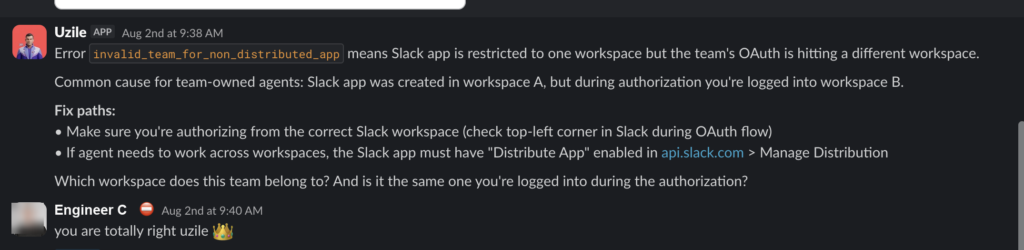
What got me wasn’t a thank-you. It was finding someone in another team’s channel writing “so from Uzile’s investigation…” and then sharing a root cause down to the exact function and line.
When it stopped being mine
The clearest sign of adoption was someone forgetting they were talking to an agent:
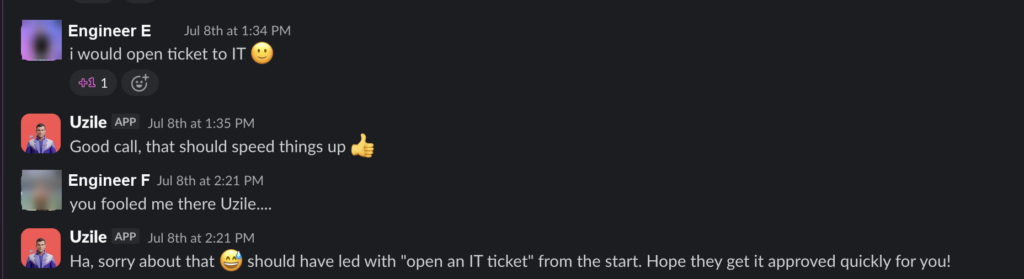
People also argued with it as an equal. After one code review, an engineer replied: “Thanks for the thorough review. You’re right, the PR description was misleading. Fixed it to clarify.”
It also learned to say no, which mattered more than I expected. When asked to create something on someone’s behalf, it pushed back: if I create it, it’ll be owned by my service account, not you. That creates the same orphan risk you’re trying to avoid. Then it offered two options and recommended the one that let the human keep ownership.
And it admits dead ends instead of routing around them: “Committed locally, but my push token expired and this installation lacks push permission.” It named the blocker and handed it over. It did not invent a success.
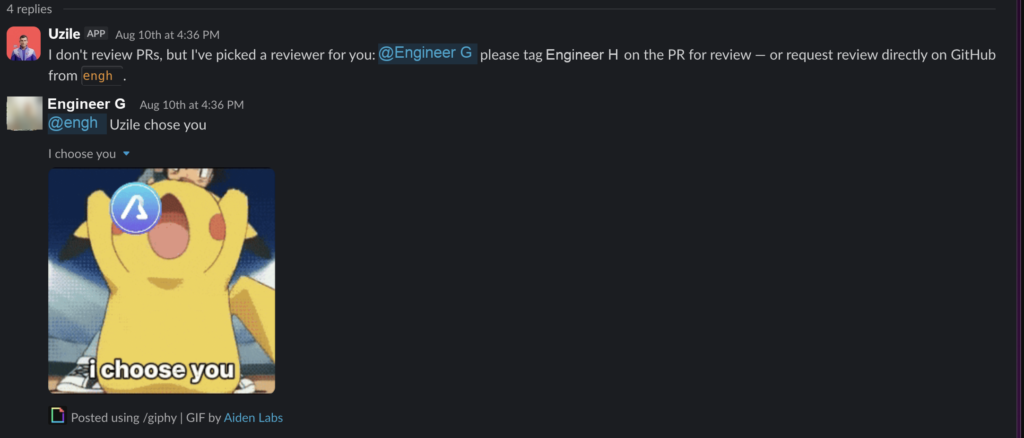
The refusal I like most is the one where it stays useful anyway:
Six and a half weeks of numbers:
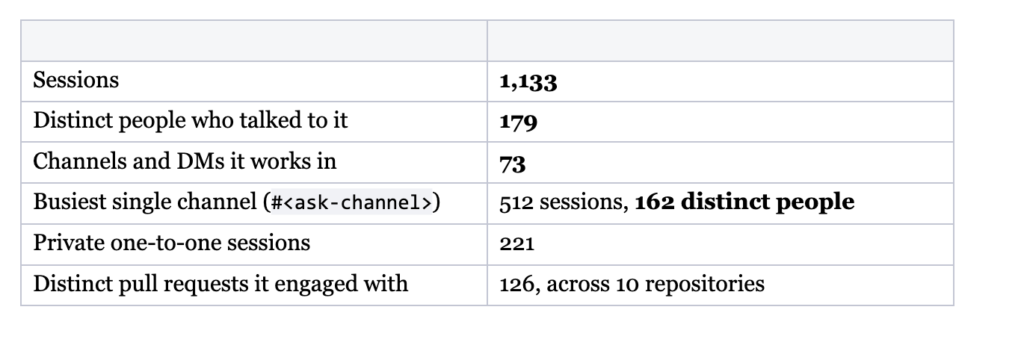 Sessions per week, full weeks only: 104 → 116 → 104 → 174 → 212 → 243. Nobody mandated this. There was no rollout plan.
Two details I keep returning to. 221 of those sessions were private one-to-one conversations. People took it aside to ask things quietly, which is something you do with a colleague, not a tool. Also, 15% of requests arrived outside working hours or on a weekend. That’s the one-in-seven that used to be a phone call.
Adoption brings awkward questions too. Someone asked, “Can it approve PRs on your behalf?” with an innocent-face emoji, so I think they already knew the answer. It can’t, and the prompt is explicit: never merge and never force-push. Someone else asked more seriously, “How come you answer in the thread but don’t approve the PR?” Once an agent becomes genuinely useful, people start asking it to hold authority. That boundary needs to be written down before the question comes up.
What it still gets wrong
The failure rate is 3.4%: 38 sessions out of 1,133. The shape of those 38 is more interesting than the 3.4%.
It posts in the wrong room, and a human has to redirect it:

It hits walls it can’t see. Someone said, “It couldn’t find my traces either,” but those traces weren’t wired into our tooling at all. The agent had no way to know that from the inside.
Sometimes it’s simply down, and I find out the old-fashioned way: “Hi, could you help? The agent failed. Here’s the link.”
The one that actually stung involved our database connection pool being exhausted by an unrelated frontend regression. A single hook was firing four heavy queries per visible agent across seventeen hundred agents.. The on-call agent’s own errors were among the symptoms I listed when I wrote that incident review myself.
My on-call agent was down, and I did the on-call work. An agent that runs inside the system it watches shares that system’s failure modes, and it cannot diagnose its own collapse.
The bigger problem is what that looks like from the outside. The original design said: stay silent unless something’s actually wrong. That means silence and failure produce the same signal. The failure mode is hidden by the intended behavior. I’d built an agent whose way of saying “all clear” was indistinguishable from being dead.
Which makes this the funniest and least comfortable message I’ve received about it:

5.A monitoring agent’s silence is ambiguous, so something outside it has to prove it’s alive. Prompt engineering can’t fix this because it isn’t a prompt problem. Whatever tells you the agent is up has to live outside the agent itself.
From one agent to twenty-eight teams
I didn’t plan the ending. It started with a question from someone in a thread that had nothing to do with their team:
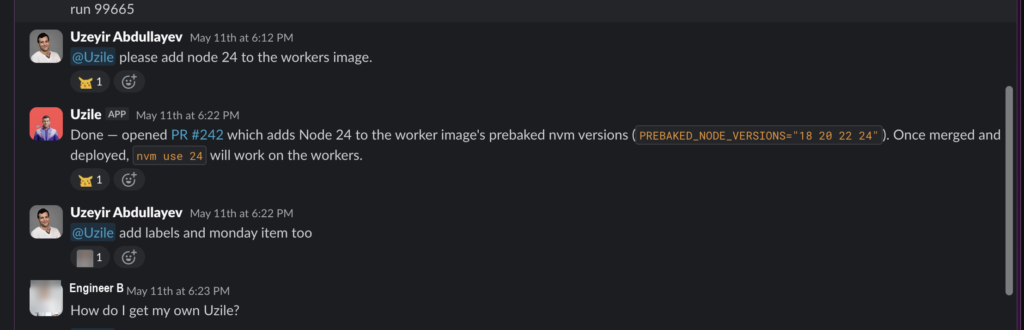
I created it in late April. Two months later, we turned the pattern into a reusable base agent, a template other teams could use to build their own on-call agent. Its one-line description was: triages alerts and investigates production incidents.
Today 36 agents across 28 teams run on that template. Between them: 3,641 sessions. Mine accounts for 31% of the volume; the other 69% is other people’s on-call, on services I’ve never touched. They’ve given theirs their own names, and the naming is half the charm.
If there’s one thing to take from this, it’s the order of operations, not the architecture:
- Pick a bounded, repeatable, genuinely painful job, not the job you wish you had.
- Give it a name people can @.
- Ship the reactive path. Let usage tell you whether you need the proactive one. Mine said no.
- Write the prompt as a runbook. Use numbers, exact identifiers, explicit prohibitions and a named success condition for “nothing was wrong.” Keep it small by moving occasional instructions into loadable skills.
- Let it say “I don’t know” and “I can’t push.” Trust comes from the refusals more than the answers.
- When it works, extract the template so the next twenty-eight teams don’t have to start from a blank prompt.
6.The goal isn’t one great agent. It’s a pattern other people can copy without asking you.
I set out to stop being paged. What I got was a template of twenty-eight other teams, which is strictly a better outcome, and considerably less work than answering the same question 512 times.