From weeks to days: Unifying the mobile and desktop monday.com marketplace with Agentic Loops

The monday.com marketplace is the go-to place where around 300,000 monthly visitors discover the platform’s ecosystem: more than 800 traditional monday.com apps, along with newer AI marketplace offerings such as AI connectors, agent templates, and agent skills.
It has two main versions. The first is the in-product marketplace, where authenticated users discover and install apps from inside monday.com. The second is the external marketplace at monday.com/marketplace, which is unauthenticated and publicly indexed. For users, partners, and search crawlers, the external marketplace is the front door to the monday.com ecosystem.
About ten months ago, our team took ownership of it. Like many inherited systems, it came with a lot of legacy behavior that did not align with the present priorities. As we moved beyond traditional apps and exposed new AI commodities in the marketplace, the most painful legacy issue surfaced: the external marketplace shipped two independent DOMs.
Desktop viewports received the current desktop marketplace, most of which was cleanly shared between the external and internal versions. Mobile viewports received a separate legacy mobile marketplace. Instead of a responsive layout branching at CSS breakpoints, we effectively had two different applications selected by the viewport. To switch between them, the page had to be (re)loaded under the relevant viewport.
The migration target was simple to state but much harder to execute: make the desktop marketplace DOM responsive to render correctly on mobile, then retire the legacy mobile DOM. Rather than building a new mobile marketplace from scratch, we’d unify everything onto a single responsive DOM based on the current desktop version.
The hard part was that we did not know the full delta.
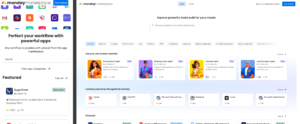 Legacy mobile marketplace vs Modern desktop marketplace
We knew some differences: the legacy mobile marketplace was not feature-complete, and some pages and flows that existed on desktop were entirely inaccessible on mobile. Since Google indexes using mobile-first crawling, those gaps were not only product inconsistencies; they carried SEO risk. A route that worked for a desktop user but was harder for Googlebot to reach in its mobile mode risked limiting how discoverable apps, partners, and new AI offerings could be. We also did not know what would break if we rendered the desktop DOM on a mobile viewport “as is.” Some issues would be obvious, like overflowing grids or headers that did not collapse. Others would only show up deep inside flows: tabs inside listing pages, filtering, category pages, and so on.
The traditional approach would have been a large manual audit. Open every relevant flow on the desktop. Open the legacy mobile version. Compare behavior. Then force the desktop DOM onto mobile, capture that state too, and translate every defect into implementation work.
That is doable but very expensive, as it carries an organizational cost that rarely shows up in the initial estimate and tends to creep up. The audit findings get translated into tasks in the backlog, which have to be groomed, prioritized, and slotted against everything else competing for capacity in the sprint. Each ambiguous case turns into a thread: screenshots need product opinion, legacy behaviors need the engineering team to confirm they were intentional, and individual layout questions wait on design review. Getting answers means scheduling reviews, pinging the right people, and waiting for them to understand the context and respond. Often, this means going back and forth as people need to be brought up to speed on the work being undertaken.
That wasn’t realistic for us. It would have consumed most of the team’s engineering and product capacity for at least one sprint, and more likely several – and the marketplace roadmap was already full of high-priority work on the new AI commodities. At the same time, agentic loop engineering was taking off, with people like Boris Cherny talking about agentic loops: a cycle in which an AI system repeatedly observes its environment, decides on an action, executes it, and feeds the result back in as new input. This problem looked unusually well suited to that style of work. The migration had a lot of repetitive grunt work and not a lot of creative or engineering decision-making. An agent could open the marketplace, force the right viewport, walk a flow, capture screenshots, compare states, and write findings back to a durable work item. Another agent could implement a focused, responsive fix. An end-to-end QA agent could replay the same flow against the PR and, if it found issues, could feed them back to the implementer.
An agentic pipeline with a loop at its core
It was clear that the monday.com marketplace was far too complex to spawn a single Claude Code workflow with the goal of “making it responsive”, and the failure modes were too quiet. An agent could make too many independent and unpredictable decisions about how to fix issues, which would not work for a product with as many users as ours.
Instead, we split the migration into an agentic pipeline with an agentic loop at its core.
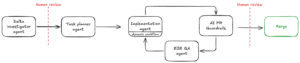
Investigating the delta
The first step in the pipeline was an investigative loop. The agent given a browser and the in-code route definitions would investigate the delta between the legacy mobile marketplace and the desktop marketplace by opening three browser sessions – legacy mobile DOM on an iPhone-sized viewport, desktop DOM on a desktop viewport and desktop DOM “as-is” on a mobile viewport (using a special staging-only flag that provided an escape hatch from the standard DOM switching mechanism) and capturing the journey step by step. The results would then be persisted as an item on a monday board.
This process would be repeated as an agentic loop until all user flows were exhausted.
Turning findings into actionable tasks
At that point, we had three useful artifacts per surface: what legacy mobile did, what desktop did, and what desktop-on-mobile currently looked like. We could inspect screenshots, compare journeys, and see where the unified DOM needed product or design decisions rather than only CSS changes.
We then summarized the open decisions across the investigation output. This was a useful human-in-the-loop checkpoint. The agents could compress a large amount of captured evidence into questions like: should mobile keep the desktop information architecture, should a carousel become a sheet expandable via a button click, should a sticky CTA survive on mobile, which desktop labels should be shortened, and which legacy mobile behaviors were intentionally different versus simply stale. It allowed us to focus on the key decisions instead of drowning in discussions about simple fixes like adjusting padding and/or margins.
We then fed those decisions into the context and ran an agent that used all the work done up to this point to break it down into implementation tasks. The key requirement was to achieve some level of parallelization, but not so much as to overwhelm our capacity to review the work (models are notoriously bad at writing CSS when left to their own devices), or as to leave us with unmanageable merge conflicts across the parallel branches.
To achieve that, we broke down the tasks into items on a monday board with a dependency structure instead of a flat backlog: foundational cross-cutting concerns first, then any new mobile-only components, then page-level tasks.
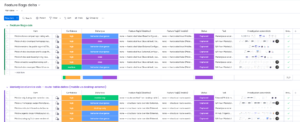
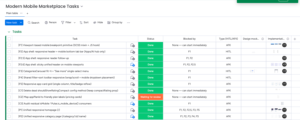
Delta investigation monday board (1) and tasks board (2). Most of the boards’ items are cut off for brevity.
Implementation and killing the manual QA loop
The implementation agent had the most flexible workflow. Its contract was narrow at the boundary: fetch the monday item, read the linked investigations and screenshots, implement the assigned responsive fix, verify the result, upload evidence back to the item, and open a PR. Inside that boundary, we let it choose the path using dynamic workflows and subagents.
For stronger models like Opus 4.8, over-constraining the exact workflow for every item is usually counterproductive, as agents, just like human developers, can encounter unpredictable issues that do not fit in whatever box we may craft for them. We only gave general verification guidance, such as using Storybook for isolated component work, but let the agent decide when it needed a throwaway story, a local repro, a code search, or a different test shape. Standard Git hooks ensured that agents could not push code that failed a type check or linting to the remote.
Once the implementation agent opened a PR, the loop did not stop. The PR went through our normal automated guardrails and then through our end-to-end QA agent, which replayed the relevant flow across the viewports. If it found issues that were in scope of the task, those findings were fed back to the implementation agent. Human PR comments worked the same way: the agent picked them up, made the requested changes, pushed again, and continued until the PR was ready to merge.
We also gave the implementation agent two forms of long-lived context. The first was a memory bank: recurring mistakes, gotchas, testing notes, and reviewer feedback that should not have to be rediscovered on every item. The second was a decision record for the migration itself: product and engineering decisions made along the way.
Results and what we’d tell others attempting this
The agents did not magically perform the whole migration in one hands-off dynamic workflow, but what they did do was change the cost profile of it by removing all of the grunt work and compressing the effort to key decisions across the main areas – product, design, engineering – and by doing so, made it viable to fit it into our busy schedule.
With the agentic pipeline, none of the coordination overhead we feared with the traditional approach materialized. There was no backlog to groom against the roadmap, no chasing owners for context, no threads left open waiting on a product or design opinion – the pipeline had already resolved the obvious cases and compressed the rest down to two or three real questions. Those got settled in a single meeting with stakeholders, in front of a fully functional demo behind a feature flag that they could click through themselves.
Getting the full task list to that point took only a week of dev time. I primarily owned code review and oversight of the agentic pipeline. Other developers helped only on small, constrained PRs, with an estimated combined effort of under 3 hours on their side. Even then, I was not fully blocked on the migration for that duration; most of the time, the agents were investigating, implementing, fixing review comments, or waiting on automated checks while regular product feature work continued, and in fact, I managed to ship another big feature (agent skills) as the primary developer during the migration work.
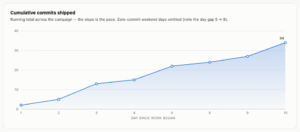
Migration pace
On the product side, the migration unlocked a reach we didn’t have before. The unified responsive DOM meant the new AI commodities could finally render for the visitors who browse on mobile – a segment the legacy mobile marketplace had left behind and which is growing: in the AI era, more users are mobile-first, especially the ones drawn to commodities like AI connectors to Claude, who tend to reach for the ease of interacting with AI products from their phones.
It also meant the marketplace now reflows correctly whenever the viewport changes size, not just at the fixed mobile and desktop breakpoints: the layout adapts continuously as the window is resized, which matters because most desktop visitors will resize their browser window at some point, and now they will not be greeted by a potentially broken experience.
Lastly, Googlebot can now index the entire marketplace consistently across mobile and desktop, strengthening our ongoing efforts to improve its SEO performance.
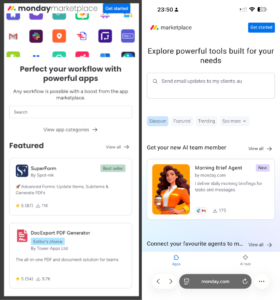
Legacy mobile marketplace vs new unified marketplace rendered on a mobile viewport
The biggest operational win was QA. The engineering-side manual QA loop was almost entirely removed. Instead of asking a developer to repeatedly open the same flows across viewport combinations, the verifier agent replayed them against the relevant matrix: legacy mobile, desktop, broken desktop-on-mobile, and PR build. Screenshots and findings came back attached to the work, so the review was about inspecting evidence rather than rediscovering behavior. That mattered because this migration had a high cost of silent failure. A naive agent prompt like “make the marketplace responsive” might produce a PR that is plausible (and agents are fantastic at this!) but breaks a listing tab, search result, or AI commodity page. This creates fake velocity where the initial batch of work is done almost immediately, but days or weeks of engineering time are later spent polishing and fixing all the hidden bugs.
The other key learning was that the agentic loop worked because the repo already had code quality defenses: company-wide AI PR review, repo-specific guardrails, git hooks, linting, typechecking, and automated PR checks. These rules minimized the number of potential modes of failure for the PR before it was even submitted.
The main lesson is that agentic speedup is strongest when the work can be decomposed into discrete stages with clear goals and inspectable artifacts. Large frontend migrations often look too risky for agents because the end goal is broad. But the intermediate steps are usually narrow: capture this flow, compare these states, implement this component behavior, verify this PR against these baselines.
That structure beats one generalist agent whenever the cost of an undetected failure is high. The goal is to minimize unreviewable speculation: give each agent a job small enough to finish, evidence strong enough to inspect, and guardrails strict enough to keep the loop moving without constant human babysitting. Within each job, set a clear goal and give the model a way to verify it’s achieved. Beyond that, let it use the advanced features of your chosen harness and decide the exact workflow shape itself – subagents, tournament mode where the orchestrator picks the best implementation, and so on.