
Zero-Downtime Cassandra Migration Between EKS Clusters

Migrating Stateful workloads is hard. Migrating distributed databases across Kubernetes clusters with zero downtime and zero data loss is even harder.
In this post, I’ll describe how we migrated our production K8ssandra clusters from old EKS clusters to new ones, following major changes in our infrastructure. While the K8ssandra operator makes it straightforward to define and manage data centers, it does not offer a built-in solution for moving an entire K8ssandra cluster across EKS clusters.
Because of that, we had to design our own migration workflow, carefully planning how to introduce new Cassandra data centers, move data safely, and eventually remove the old ones. This post focuses on the planning, challenges, and practical decisions that made this migration possible in production.
Before we jump right in, let’s briefly explain what K8ssandra is.
A Short Introduction to K8ssandra
K8ssandra is a Kubernetes operator for Cassandra. It helps us easily manage Cassandra clusters and data centers. At a high level, K8ssandra is composed of two operators, both running in management and data EKS clusters, each responsible for a different layer:
- K8ssandra Operator – this operator manages the K8ssandraCluster custom resource. It acts as the orchestrator, defining the desired state of the overall Cassandra topology, such as how many data centers we have, which EKS clusters they run on, and how they are configured. It does not directly manage Cassandra pods.
- Cass Operator – for each data center defined by the K8ssandra operator, the Cass Operator is responsible for the actual lifecycle of Cassandra nodes. It manages the lower layer, which is the actual StatefulSets and the nodes themselves.
In our architecture, we run one EKS cluster that acts as the control plane, and separate EKS clusters that host the Cassandra data plane, each corresponding to a Cassandra data center.
Our Plan to Overcome Migrating a Stateful Workload
We had multiple K8ssandra clusters running in our production environment on some legacy EKS clusters.
Over time, our company changed how infrastructure is provisioned and managed, introducing a new approach to Helm chart management and moving EKS cluster creation from Terraform and CDKTF. To stay aligned with this new standard and avoid relying on infrastructure that would eventually be deprecated, we needed to migrate our K8ssandra clusters to new EKS clusters.
Since K8ssandra is a stateful workload, migrating it with zero downtime and zero data loss was a significant challenge.
Our infrastructure:
3 K8ssandra clusters, each with 2 K8ssandra datacenters (one in each EKS cluster), and each with a different number of nodes.
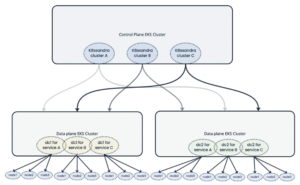
We found in the K8ssandra documentation that adding a new data center to an existing cluster could be done using an annotation. However, our case was different: we needed to bring up an entirely new K8ssandra cluster on a new EKS cluster, managed by a separate K8ssandra operator. Because of that, the annotation-based approach could only help later, when adding an additional K8ssandra data center, but not for creating the first one. As a result, we had to design and plan our own migration workflow.
Create a New K8ssandra Cluster with One K8ssandra Data Center
First, we deployed the new K8ssandra operator on the new clusters, and scaled down both operator deployments ‘k8ssandra-operator-cass-operator’ and ‘k8ssandra-operator’ in the old control-plane EKS cluster, so there wouldn’t be any race condition between the old and the new operator.
When we tried to delete the old data centers at the end, we failed because the old operator tried to recreate them. Therefore, we decided to scale down initially to avoid future problems.
After the old operator went down, we deployed the K8ssandra clusters in a new EKS cluster, creating a new data center.
This K8ssandra cluster was separate, but had to be somehow connected to the old one to move the data. To connect the two, we set the following in the new K8ssandra cluster deployment:
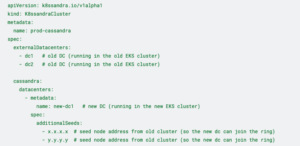
At this point, we had two K8ssandra clusters with the same name across three data centers (two old and one new), with data not yet replicated to the new data center. Afterwards, we were supposed to connect to the new K8ssandra cluster with the old K8ssandra cluster superuser permissions, because, again, we set all 3 data centers to know each other and behave as if they were one K8ssandra cluster.
The problem: we couldn’t connect to it because the data across nodes hadn’t been replicated yet. The system_auth keyspace, which stores roles and permissions, had not been replicated to the new data center. As a result, the new nodes were missing the superuser role, preventing us from connecting to the database from them.
Therefore, we needed to alter the system_auth keyspace (inside one of the old nodes) and then run repair all on nodes to compare data between replicas and stream the missing ranges to the new replicas:

Afterwards, we were supposed to be able to connect from the new nodes, so we connected and altered the user keyspace, system_traces, reaper_db, and system_distributed keyspaces, and added the new dc:

Then, for each new node, we had to run nodetool rebuild dc1 (while dc1 was one of the old dcs), but rebuilding across many nodes when there was a lot of data was another new problem. It can take hours, so running it manually is not an option, and running it with a local script – we tried, and the computer turned off in the middle and ruined the whole process.
So, how did we solve the rebuild process issue?
In short, we used our internal tool, which runs Temporal workflows in the background and handles timeouts and retries. This allowed us to run the rebuild in a safe, controlled way, without relying on local scripts or keeping a single machine running for the entire operation, and made the process much more reliable.
Expanding the Cluster with a New Data Center and Safely Removing the Old Ones
Now we have arrived at the easiest part: adding the second data center.
Since the first one was already connected to the old K8ssandra cluster, we just needed to add another one to an existing K8ssandra cluster. Here we used what the K8ssandra documentation says – add the second dc with the following annotation (it’s added to the K8ssandraCluster CRD):

This annotation created a new cassandraTask CRD, which was responsible for what we did manually with the first new-dc1: altering the keyspaces and running repair and rebuild.
Last but not least, we had to delete the old data centers from the old EKS clusters.
After the new data center was ready, our focus moved from migrating data to traffic manipulation and resource cleanup. We first updated the services’ connection strings to point to the new data center and verified that no applications were still actively connecting to the old ones. At this point, the old operator was already scaled down, so no race condition to worry about.
With traffic fully moved from the old data centers to the new ones, we simplified the cluster configuration. The external data center references and additional seed nodes were removed, leaving a clean environment.
However, the Cassandra ring still “remembered” the old data centers. To complete this process, we connected to one of the new nodes and updated all keyspaces to replicate only to the new data centers, removing the old ones from the replication settings using the ALTER KEYSPACE command. Once Cassandra no longer considered the old data centers part of its replication strategy, we manually removed the old data centers’ resources and the remaining nodes with the “nodetool removenode” command to fully delete them from the cluster.
Migration Outcomes and Next Steps
This migration showed us that Stateful systems demand a different mindset than stateless workloads. Success depended less on speed and more on control, automation, and failure handling.
By planning the migration in stages, understanding operator behavior, and automating long-running tasks like rebuilds, we were able to migrate our K8ssandra clusters without downtime or data loss. If you’re facing a similar migration, invest early in planning and automation – it will save you from painful recovery work later.
So what happened after this migration? The hardest part is behind us, but what about ensuring our backups work after the migration? Monitoring? Dashboards and alerts? This project was massive and included a lot of work before and after, but the most important thing is that our K8ssandra clusters are up and running in the new EKS clusters; we didn’t cause any data loss or downtime, so mission accomplished.